
Overview
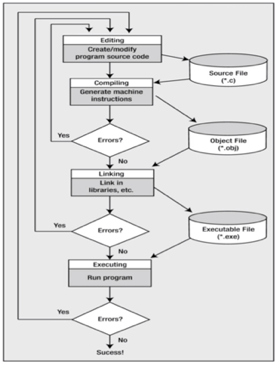
- There are four fundamental tasks in the creating
of any C program
- Editing
- Compiling
- Linking
- Executing
- These tasks will become second nature to you because you will be doing it so often
- The processes of editing, compiling, linking, and executing are essentially the same for developing programs in any environment and with any compiled language
- Editing is the process of creating and modifying
your C source code
- source code is inside a file and contains the program instructions you write
- choose a wise name for your base file name (all source files end in the .c extension)
Compiling
- A compiler converts your source code into
machine language and detects and reports errors in your code
- The input to the compiler is the file you produce during your editing (source file)
- Compilation is a two-stage process
- the first stage is called the preprocessing phase, during which your code may be modified or added to
- the second stage is the actual compilation that generates the object code
- the compiler examines each program statement and
checks it to ensure that it conforms to the syntax and semantics of the
language
- can also recognize structural errors (dead code)
- does not find logic errors
- typical errors reported might be due to an expression that has unbalanced parentheses (syntactic error), or due to the use of a variable that is not “define” (semantic error)
Compiling (cont’d)
- After all errors are fixed, the compiler will then take each statement of the program and translate it into assembly language
- the compiler will then translate the assembly
language statement into actual machine instructions
- the output from the compiler is known as object code and it is stored in files called object files (same name as source file with a .obj or .o extension)
- The standard command to compile your C programs
will be cc (or the GNU compiler, which is .gcc)
- cc -c myprog.c or gcc -c myprog.c
- if you omit the -c flag, your program will automatically be linked as well
Linking
- After the program has been translated into
object code, it is ready to be linked
- The purpose of the linking phase is to get the program into a final form for execution on the computer
- linking usually occurs automatically when compiling depending on what system you are on, but, can sometimes be a separate command
- The linker combines the object modules generated
by the compiler with additional libraries needed by the program to create the
whole executable
- also detects and reports errors
- if part of your program is missing or a nonexistent library component is referenced
- also detects and reports errors
- Program libraries support and extend the C
language by providing routines to carry out operations that are not part of the
language
- input and output libraries, mathematical libraries, string manipulation libraries
Linking (cont’d)
- A failure during the linking phase means that once again you have to go back and edit your source code
- Success will produce an executable file
- In a Windows environment, the executable file will have an .exe extension
- in Unix / Linux, there will be no such extension (a.out by default)
- Many IDEs have a build option, which will compile and link your program in a single operation to produce the executable
- A program of any significant size will consist
of several source code files
- each source code file needs the compiler to generate the object file that need to be linked
- the program is much easier to manage by breaking
it up into a number of smaller source files
- It is cohesive and makes the development and maintenance of the program a lot easier
- the set of source files that make up the program will usually be integrated under a project name, which is used to refer to the whole program
Executing
- In most IDEs, you’ll find an appropriate menu command that allows you to run or execute your compiled program
- Otherwise double click the exe file or type a.out on the console in linux manually
- The execution stage is where you run your program
- each of the statement of the program is sequentially executed in turn
- If the program requests any data from the user the program temporarily suspends its execution so that the input can be entered
- Results that are displayed by the program (output) appear in a window called the console
- this stage can also generate a wide variety of error conditions
- producing the wrong output
- If the program does not perform the intended functionality
then it will be necessary to go back and reanalyze the program’s logic
- known as the debugging phase, correct all the known problems or bugs from the program
- Will need to make changes to the original source
program
- the entire process of compiling, linking, and executing the program must be repeated until the desired results are obtained
 GrayCS